
Microsoft Agent 365 UAE is the most significant new AI product launching in 2026 – and UAE enterprises have a first-mover advantage that no business should ignore.
Launching on 1 May 2026, Microsoft Agent 365 UAE is a centralised control plane that gives organisations complete visibility, governance, and security across every AI agent deployed in their Microsoft ecosystem. For businesses in Dubai, Abu Dhabi, and Sharjah that are accelerating AI adoption, AI agents for business UAE represent the next evolution beyond simple Copilot prompting.
This guide explains what Microsoft Agent 365 UAE is, why it matters, and how FlowBe is preparing UAE enterprises for the agentic AI era.
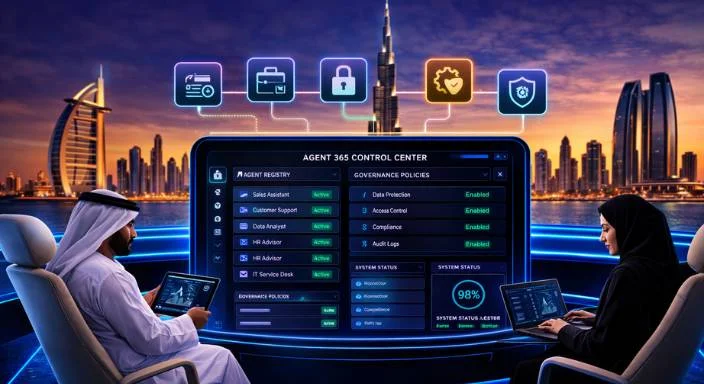
Microsoft Agent 365 UAE is a new product in the Microsoft 365 ecosystem designed to help organisations deploy, monitor, and govern AI agents at enterprise scale.
Microsoft Agent 365 UAE: FlowBe helps UAE businesses in Dubai, Abu Dhabi and Sharjah with expert guidance, setup and support as a Microsoft Certified Partner.
Unlike Microsoft 365 Copilot, which assists individual users, Microsoft Agent 365 UAE coordinates agents that work autonomously on complex multi-step business processes – without constant human input.
Microsoft agentic AI Dubai enables agents to handle everything from customer service case routing to procurement approvals, HR onboarding, and financial reconciliation – automatically, securely, and within Microsoft’s compliance framework.
The shift from AI assistants to AI agents is the defining enterprise technology transition of 2026. AI agents for business UAE do not just help employees work faster – they independently complete tasks, interact with systems, and coordinate with other agents.
💡 Microsoft 365 Copilot UAE is fully compliant with the UAE Cybersecurity Council AI Policy – ensuring responsible deployment across government and enterprise. |
AI agents for business UAE in Dynamics 365 Sales automatically update CRM records, draft follow-up emails, schedule meetings, and flag at-risk deals — without a salesperson lifting a finger.
Microsoft Agent 365 UAE powers autonomous customer service bots that handle case intake, routing, resolution suggestions, and escalation – integrating with your existing Dynamics 365 Customer Service environment.
Build AI agents for business UAE that automate new employee onboarding – document collection, system provisioning, training scheduling, and IT access setup – reducing onboarding time from days to hours.
Microsoft agentic AI Dubai enables procurement agents that process purchase orders, validate supplier information, route approvals, and log transactions – connecting Power Automate, Dynamics 365, and SharePoint.
Microsoft Agent 365 UAE supports finance agents that reconcile transactions, generate variance reports, flag anomalies, and prepare month-end summaries – with full audit trails for UAE compliance.
| Feature | Details |
|---|---|
| Feature | Microsoft 365 Copilot |
| Works with | Individual users |
| Trigger | User prompt |
| Task scope | Single task (draft email, summarise) |
| Human involvement | Required each time |
| Governance | Purview policies |
| Price | ~USD 30/user/month add-on |

FlowBe is one of the first Microsoft Certified Partners in the UAE to prepare enterprise clients for Microsoft Agent 365 UAE deployment. Our structured approach ensures AI agents for business UAE are deployed safely, compliantly, and with measurable ROI.
Microsoft Agent 365 UAE is a centralised AI agent control plane launching May 2026, giving UAE enterprises complete visibility, governance, and security across autonomous AI agents in their Microsoft environment.
Microsoft Agent 365 UAE is available for purchase from 1 May 2026 at USD 15 per user per month. It is included in Microsoft 365 E7: The Frontier Suite at USD 99 per user monthly.
AI agents for business UAE operate autonomously on multi-step processes without user prompts. Copilot assists individual users on demand. Agent 365 governs both across your organisation securely.
Yes. Microsoft agentic AI Dubai includes runtime threat protection, agent registry, inline DLP, and insider risk management — all aligned with UAE cybersecurity and data governance regulations.
Yes. FlowBe is a Microsoft Certified Partner in the UAE with hands-on experience in Copilot Studio and Power Platform, making us well-placed to deploy AI agents for business UAE.
Microsoft Agent 365 UAE works with Microsoft 365 E3, E5, or the new E7 Frontier Suite. FlowBe can advise on the right licence for your organisation’s size and agentic AI goals.
Finance, healthcare, logistics, retail, and professional services in Dubai benefit most — anywhere repetitive multi-step processes can be automated to save time and reduce human error significantly.
Microsoft Agent 365 UAE represents the next chapter of enterprise AI – beyond productivity assistance into true business process automation. For organisations in Dubai, Abu Dhabi, and Sharjah, the launch in May 2026 is a strategic window to gain competitive advantage.
AI agents for business UAE are already transforming sales, customer service, HR, procurement, and finance – and Microsoft agentic AI Dubai is only getting more powerful with each release wave.
Microsoft Business Solutions & Services in UAE
Microsoft Certified Partner in the UAE | Microsoft Power Platform UAE | Microsoft Power Automate UAE | Dynamics 365 Implementation Services UAE | Microsoft 365 Business Premium | Contact FlowBe

Content writer at Flowbe AE specialising in home maintenance, cleaning services, and lifestyle solutions. I craft SEO-focused, customer-friendly content that builds trust, improves visibility, and drives bookings across UAE markets.